前言 最近在找工作背八股,看到这个shiro721的时候发现在两年前我研究过,翻开文章回忆发现自己写得还挺好的开源一下
前置知识 需要理清的几个概念
一些密码运算符 C表示密文P表示明文E(P)表示对一段明文加密D(C)表示对一段密文解密
表示两个数据进行xor运算
xor 计算机中的xor运算是这样进行的,首先把一个字符用8个比特的二进制形式表示
对数字的每一位对应做这样的事情
如果是相同数字,则得0,不同数字则得1,也就是说
1 5 xor 6` = `0101 xor 0110` = `0011` = `3
特殊性质 0 xor 任何数 = 这个数 相同的数进行xor会等于0 AES加密算法 因为CBC字节翻转攻击是对CBC这个分组模式的攻击,所以只需清楚AES的几个性质
在 AES 加解密过程中,每一块都是 128 比特,也就是16字节 AES是对称加密,需要公钥进行解密 CBC分组 我们有一个明文,和一个初始向量iv(同样是一组16字节的数据)它经过CBC加密分组的流程如下
首先将明文进行拆分,分为16字节一组,若不满则补全
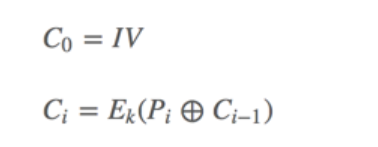
第一组明文与iv进行异或后进行AES加密
接着第二组明文与上面加密的密文进行异或再加密
接着第三组的明文与上面加密的密文进行异或再加密
如此反复拼接后得到最终密文
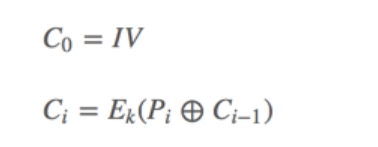
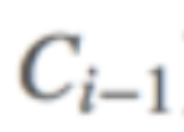
公式表示:
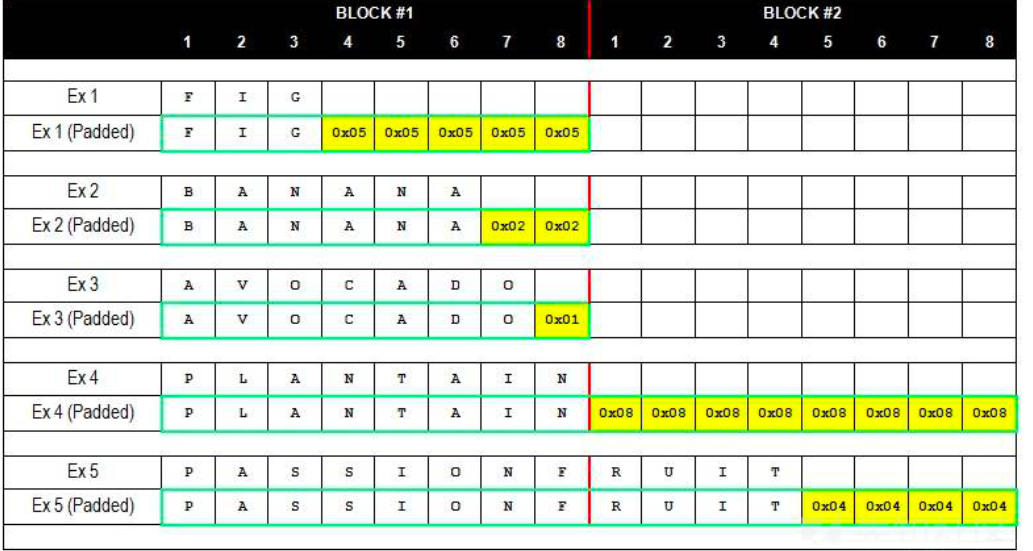
填充规则 我们说过,分组的每一组都应是16字节(PKCS7Padding定义中,对于块的大小是不确定的,可以在1-255之间,而PKCS5是确定的8字节),但我们的密文的字节数不可能时刻满足16的倍数,所以我们就需要填充
PKC #7 用于AES算法来补充16字节分组,规则如下,假设缺的值为n,那么它就会补上n个0x0n(或者0xn考虑缺两位数字节的情况)
示例代码
1 2 3 4 5 6 7 8 9 10 11 12 13 14 15 16 17 18 19 20 21 22 23 24 25 26 27 28 29 30 31 32 33 34 from Crypto.Cipher import AESfrom Crypto.Random import get_random_bytesdef pad (s ): return s + (AES.block_size - len (s) % AES.block_size) * chr (AES.block_size - len (s) % AES.block_size) def unpad (s ): return s[:-ord (s[len (s)-1 :])] def encrypt (plain_text, key ,iv ): plain_text = plain_text cipher = AES.new(key, AES.MODE_CBC, iv) return (iv + cipher.encrypt(pad((plain_text)).encode())) def decrypt (cipher_text, key ,iv ): cipher_text = (cipher_text) cipher = AES.new(key, AES.MODE_CBC, iv) return (cipher.decrypt(cipher_text[AES.block_size:])) iv = "1234567890123456" .encode() key = get_random_bytes(16 ) plain_text = "ewojiemojiecoji" cipher_text = encrypt(plain_text, key,iv) print (cipher_text)decrypted_text = decrypt(cipher_text, key,iv) print (decrypted_text)''' output: b'1234567890123456(V\xcc\xdb \x7f\xe0\xcb\xab\x07E\xaaL\xc3\x14\xba' b'ewojiemojiecoji\x01' '''
PKC #5 用于DES算法,填充8字节,规则和PKC #7一样
原始加解密脚本 1 2 3 4 5 6 7 8 9 10 11 12 13 14 15 16 17 18 19 20 21 22 23 24 25 26 27 28 29 30 31 32 33 34 35 36 37 from Crypto.Cipher import AESfrom Crypto.Random import get_random_bytes''' 省略自动填充,我们仅以正好为16倍数的字节数为例,对攻击并无大碍 def pad(s): return s + (AES.block_size - len(s) % AES.block_size) * chr(AES.block_size - len(s) % AES.block_size) def unpad(s): return s[:-ord(s[len(s)-1:])] ''' def encrypt (plain_text, key ,iv ): plain_text = plain_text cipher = AES.new(key, AES.MODE_CBC, iv) return (iv + cipher.encrypt(plain_text.encode())) def decrypt (cipher_text, key ,iv ): cipher_text = (cipher_text) cipher = AES.new(key, AES.MODE_CBC, iv) return (cipher.decrypt(cipher_text[AES.block_size:])) iv = "1234567890123456" .encode() key = get_random_bytes(16 ) plain_text = "12345678901ewoji12345678901ewoji" cipher_text = encrypt(plain_text, key,iv) print (cipher_text)decrypted_text = decrypt(cipher_text, key,iv) print (decrypted_text)''' output: b"1234567890123456'\xb8\xd2\xb6\xca\x06\xb3\xb0\x12\x81\xbc\\v\x11\xa0\xace}[\xb5\xb2\xca\x18\x01\xf1\x92-\xf9aX;_" b'12345678901ewoji12345678901ewoji' '''
Byte-Flipping Attack
分三行解释
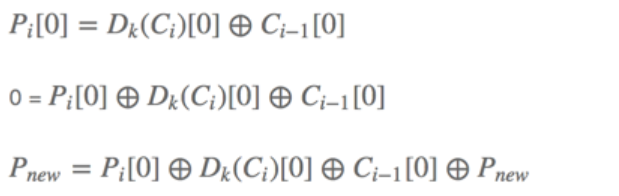
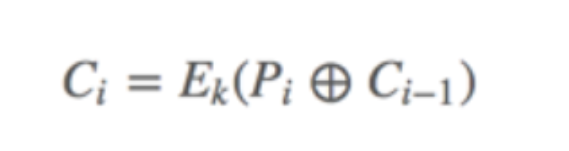
第i组密文的第一个字符由第i组的明文的第一个字符和i-1组的密文的第一个字符xor得来 自己和自己xor结果为0 0和Pnew进行xor结果当然就是Pnew 到这里就很明显了,当我们要加密i组明文时,是要经过
也就是说只要
等于
我们在加密的时候就改变了i组的明文
大白话就是:我们要修改第n组的第i个明文,我们就要去修改第n-1的第i个密文,让第n-1组的这个密文等于自己和第n组明文和要修改的明文的异或结果即可
代码实现 1 plain_text = "12345678901ewoji12345678901ewoji"
目标,把最后的ewoji改为emoji
1 2 3 4 5 6 7 8 9 10 11 12 13 14 15 16 17 18 19 20 21 22 23 def encrypt (plain_text, key ,iv): plain_text = plain_text cipher = AES.new (key, AES.MODE_CBC, iv) return (iv + cipher.encrypt (plain_text.encode ())) def decrypt (cipher_text, key ,iv): cipher_text = (cipher_text) cipher = AES.new (key, AES.MODE_CBC, iv) return (cipher.decrypt (cipher_text[AES.block_size :])) def exp (plain_text,key,iv): print ("Original plaintext:\n" +plain_text) cipher_text = list (encrypt (plain_text,key,iv)) cipher_text[28 ] = cipher_text[28 ] ^ ord ('w' ) ^ ord ('m' ) res = decrypt (bytes (cipher_text),key,iv) print ("Altered plaintext:" ) print (res) iv = "1234567890123456" .encode () key = get_random_bytes (16 ) plain_text = "12345678901ewoji12345678901ewoji" exp (plain_text,key,iv)
关键部分cipher_text[28] = cipher_text[28] ^ ord('w') ^ ord('m')
成功修改,但是也出现了很多乱码,是因为修改了第二组的字节所以第一第二组都会受到影响,但不会影响第三组
如果我们可以知道iv的话,从iv开始改,就可以做到无痛修改,但也仅限修改第二组
Padding Oracle Attack与shiro721 Padding Oracle Attack这攻击原来这么早就有了,在2011年的Pwnie Rewards中被评为”最具有价值的服务器漏洞“。
前置知识 不正确的响应模式 一些服务器在接受反序列数据且使用的是CBC分组模式时(以session认证为例),容易写成如下
如果正确反序列化且和服务器的session一致,返回200OK 如果正确反序列但和服务器的session不一致,返回200但提示错误 如果错误反序列化,则返回500 什么叫错误反序列化?上文提到过CBC的填充模式,如果解密的数据被正确填充,则是正确反序列化,反之,错误的反序列化
举个例子:比如我们要16字节一组,但我们只有ewojiemojiecoji(15个字节),所以应在末尾填充0x01
当我们解密出来时,发现最后是0x01且前面都是非填充字符,则为正确填充
若有人篡改的数据,导致解密出来末尾单个是0x02,则为错误填充,返回500
CBC解密中间值不变 什么是中间值?为什么不变?
回顾我们的加密过程
我们的第i组密文由i-1组的明文加密后和第i组明文异或后加密得来
那解密的时候呢
先把第i组的密文解密后与i-1的密文异或得到明文
这过程细品,尽管我们如何改变第i组的明文或者密文
加密时,还是和i-1的密文进行异或
解密时,还是和i-1的密文进行异或
也就是说我想说的不变的中间值,就是值i-1组的密文
漏洞利用 有了前置知识后就可以很清楚的知道漏洞具体是如何产生的,漏洞必须要放在一个场景来理解,不然会有点抽象
有这么个场景:现在有一个存在不正确的响应模式且用的是AES-CBC加密session的服务器,我们抓包发现存在session,但不知道session明文的值,更不用说如何修改,这时你该如何运用上面的知识exploit it
明文:ewojiemojiecoji
密文:MTIzNDU2Nzg5MDEyMzQ1Nue3qITNrq3spyYdJ9QwPY4=
key:you_need_16_char(未知)
iv=1234567890123456(分组解码即可得到)
1 2 3 4 5 6 7 8 9 10 11 12 from Crypto.Cipher import AESfrom Crypto.Random import get_random_bytesimport base64ctext = "MTIzNDU2Nzg5MDEyMzQ1NkpV/acocYwfqjISZcU9raU=" .encode() cbytes = base64.b64decode(ctext) iv = cbytes[0 :16 ] text = cbytes[16 :32 ] print (iv)print (text)
利用响应fuzz出明文 简单写一个server
1 2 3 4 5 6 7 8 9 10 11 12 13 14 15 16 17 18 19 20 21 22 23 24 25 26 27 28 29 30 31 32 33 34 35 36 37 38 39 40 41 42 43 44 45 from Crypto.Cipher import AESfrom Crypto.Random import get_random_bytesimport base64key = 'you_need_16_char' .encode() iv = "1234567890123456" .encode() ctext = "MTIzNDU2Nzg5MDEyMzQ1NkpV/acocYwfqjISZcU9raU=" padding_dict = { 1 : 1 , 2 : 2 , 3 : 3 , 4 : 4 , 5 : 5 , 6 : 6 , 7 : 7 , 8 : 8 , "\t" : 9 , "\n" : 10 , "\x0b" : 11 , "\x0c" : 12 , "\r" : 13 , "\x0e" : 14 , "\x0f" : 15 , } def identify (ctext,key,iv ): cipher_text = base64.b64decode(ctext) cipher = AES.new(key, AES.MODE_CBC, iv) unvalid_data = (cipher.decrypt(((cipher_text[AES.block_size:])))) num = padding_dict[unvalid_data[15 ]] if (unvalid_data[-num:].decode() == num*chr (num)): print ("correct padding!" ) if (unvalid_data[:-num].decode() == "ewojiemojiecoji" ): print ("200 and you are ewoji" ) else : print ("200 but you are not ewoji" ) else : print ("500 incorrect padding!!!!" ) identify(ctext,key,iv)
正确的密文,正确的解码,正确的识别
试想,我们不断改变iv会发生什么,我们将iv改为0000000000000001
一切都变了,格式也不对,文本更不可能变了
我们接着变iv0000000000000006
可以看到文本虽然不对,但是格式对了,所以返回了200
得到中间值(也就是明文加密后的最后一位)C = 6 xor 1 =7
而中间值在跟我们已知的iv的最后一位6进行xor就可以得到密文0x01
1 2 3 4 c = ord ("1" ) ^ ord ("6" ) P = c ^ ord ("6" ) print (chr (P))
到这可能还不够清晰,因为我们最后一位本来就是0x01
如果不理解还可以继续往下看
iv=00000000000000^5
解出来乱文,但最后成功pad了,所以依然是200,按上面中间值不变的思路,我们推出倒数第二位正文
1 2 3 4 c = ord ("\x02" ) ^ ord ("^" ) d = c ^ ord ("5" ) print (chr (d))
而后我们继续从500和200的响应中fuzz出,xxxxxxxxxxxxx\x03\x03\x03
按上面继续推出正文,如此反复直到推出所有正文
改变值 根据CBC字节翻转的原理就可以控制iv的下一组值了,由此完成漏洞利用
shiro721 那么在shiro框架中在哪犯了这个毛病呢
padding失败,返回rememberMe=deleteMe padding成功,返回正常的响应数据 所以和我们上面说的条件是一样的
相关例题 [2024H&NCTF]flipPin 1 2 3 4 5 6 7 8 9 10 11 12 13 14 15 16 17 18 19 20 21 22 23 24 25 26 27 28 29 30 31 32 33 34 35 36 37 38 39 40 41 42 43 44 45 46 47 48 49 50 51 52 53 54 55 56 57 58 59 60 61 62 63 64 65 66 67 68 69 70 71 72 73 74 75 76 77 78 79 80 81 82 83 84 85 86 87 88 from flask import Flask, request, abortfrom Crypto.Cipher import AESfrom Crypto.Random import get_random_bytesfrom Crypto.Util.Padding import pad, unpadfrom flask import Flask, request, Responsefrom base64 import b64encode, b64decodeimport jsondefault_session = '{"admin": 0, "username": "user1"}' key = get_random_bytes(AES.block_size) def encrypt (session ): iv = get_random_bytes(AES.block_size) cipher = AES.new(key, AES.MODE_CBC, iv) return b64encode(iv + cipher.encrypt(pad(session.encode('utf-8' ), AES.block_size))) def decrypt (session ): raw = b64decode(session) cipher = AES.new(key, AES.MODE_CBC, raw[:AES.block_size]) try : res = unpad(cipher.decrypt(raw[AES.block_size:]), AES.block_size).decode('utf-8' ) return res except Exception as e: print (e) app = Flask(__name__) filename_blacklist = { 'self' , 'cgroup' , 'mountinfo' , 'env' , 'flag' } @app.route("/" def index (): session = request.cookies.get('session' ) if session is None : res = Response( "welcome to the FlipPIN server try request /hint to get the hint" ) res.set_cookie('session' , encrypt(default_session).decode()) return res else : return 'have a fun' @app.route("/hint" def hint (): res = Response(open (__file__).read(), mimetype='text/plain' ) return res @app.route("/read" def file (): session = request.cookies.get('session' ) if session is None : res = Response("you are not logged in" ) res.set_cookie('session' , encrypt(default_session)) return res else : plain_session = decrypt(session) if plain_session is None : return 'don\'t hack me' session_data = json.loads(plain_session) if session_data['admin' ] : filename = request.args.get('filename' ) if any (blacklist_str in filename for blacklist_str in filename_blacklist): abort(403 , description='Access to this file is forbidden.' ) try : with open (filename, 'r' ) as f: return f.read() except FileNotFoundError: abort(404 , description='File not found.' ) except Exception as e: abort(500 , description=f'An error occurred: {str (e)} ' ) else : return 'You are not an administrator' if __name__ == "__main__" : app.run(host="0.0.0.0" , port=9091 , debug=True )
目标:把session中的admin改为1,接着可以任意文件读取来计算pin码(后面忽略了因为和cbc无关)
代码逻辑:给普通用户下发一个密文session,是由明文{"admin": 0, "username": "user1"}通过encrypt()加密得来的,最后再从咱的session中decrypt后判断admin的值
漏洞分析:可控值为session,因为这里session如果已经发送就不会再改变而且session中包含iv,也就是说第一组的iv可控,而admin的属性值刚好就在第二组,所以可以实现无痛改值
编写exp:
1 2 3 4 5 6 7 8 9 10 11 12 13 14 15 16 17 18 19 20 21 22 23 24 25 26 27 28 29 from Crypto.Cipher import AESfrom Crypto.Random import get_random_bytesfrom Crypto.Util.Padding import pad, unpadfrom base64 import b64encode, b64decodedefault_session = '{"admin": 0, "username": "user1"}' key = "you_need_16_char" .encode('utf-8' ) def encrypt (session ): iv = get_random_bytes(AES.block_size) cipher = AES.new(key, AES.MODE_CBC, iv) return b64encode(iv + cipher.encrypt(pad(session.encode('utf-8' ), AES.block_size))) def decrypt (session ): raw = b64decode(session) cipher = AES.new(key, AES.MODE_CBC, raw[:AES.block_size]) try : res = unpad(cipher.decrypt(raw[AES.block_size:]), AES.block_size) return res except Exception as e: print (e) Original_session = "hEQ/vgfpFdYmWvsTv5Kmj6x0TOXzLf/GjxVq88WPCq3hqgexPxFZc1ALch6BX4eKYgovZIyNiyRNHs2Rg8ApJg==" byte_session = list ((b64decode(Original_session.encode()))) byte_session[default_session.index('0' )]^= 1 Altered_session = bytes (byte_session) print (decrypt(b64encode(Altered_session)))
发现最终解密出来的admin就是1
[NewStarCTF 公开赛赛道]flip-flop 1 2 3 4 5 6 7 8 9 10 11 12 13 14 15 16 17 18 19 20 21 22 23 24 25 26 27 28 29 30 31 32 33 34 35 36 37 38 39 40 41 42 43 44 45 46 47 48 import osfrom Crypto.Cipher import AESfrom secret import FLAGauth_major_key = os.urandom(16 ) BANNER = """ Login as admin to get the flag ! """ MENU = """ Enter your choice [1] Create NewStarCTF Account [2] Create Admin Account [3] Login [4] Exit """ print (BANNER)while True : print (MENU) option = int (input ('> ' )) if option == 1 : auth_pt = b'NewStarCTFer____' user_key = os.urandom(16 ) cipher = AES.new(auth_major_key, AES.MODE_CBC, user_key) code = cipher.encrypt(auth_pt) print (f'here is your authcode: {user_key.hex () + code.hex ()} ' ) elif option == 2 : print ('GET OUT !!!!!!' ) elif option == 3 : authcode = input ('Enter your authcode > ' ) user_key = bytes .fromhex(authcode)[:16 ] code = bytes .fromhex(authcode)[16 :] cipher = AES.new(auth_major_key, AES.MODE_CBC, user_key) auth_pt = cipher.decrypt(code) if auth_pt == b'AdminAdmin______' : print (FLAG) elif auth_pt == b'NewStarCTFer____' : print ('Have fun!!' ) else : print ('Who are you?' ) elif option == 4 : print ('ByeBye' ) exit(0 ) else : print ("WTF" )
nc题,给源码,知道上面原理之后其实感觉就是小卡拉密题,直接搓脚本吧
把NewStarCTFer____换成AdminAdmin______即可,用的hex编的码,都是16字节我哭死
1 2 3 4 5 6 7 8 9 10 11 12 13 htext = "0dfe11dbee2a5100dba9bd441e2ca60cab26029c054ee566fd21b0ea1dcc9016" btext = bytes .fromhex(htext) iv = btext[:16 ] ctext = btext[16 :] otext = "NewStarCTFer____" etext = "AdminAdmin______" res = [] for i,j,k in zip (iv,otext,etext): res.append(i ^ ord (j) ^ ord (k)) payload = bytes (res).hex ()+ctext.hex () print (payload)